How To: Set Up Freedom 5G Home Internet - Activate, Install and Manage Settings
Contents
Overview
Once you receive your Freedom 5G Home Internet equipment, you can complete your set up in 2 easy steps:
Activate the Freedom 5G Home Internet service
Set up the Nokia gateway
We recommend changing the Wi-Fi network name and password as a final step to complete setup.
Activate 5G Home Internet Service
Before setting up your device, activate your Freedom 5G Home Internet SIM card (already pre-inserted) by following the steps below:
Enter your SIM Card number and Phone Number to begin the activation.
The SIM Card Number -Found on your packing slip, it is the 19-digit number starting with 891490************.
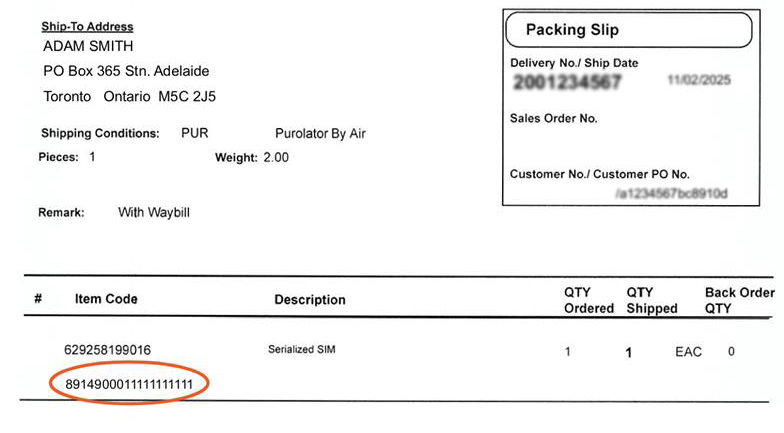
Phone Number – Found in the Critical Information Summary document included in your
Freedom Mobile agreement email.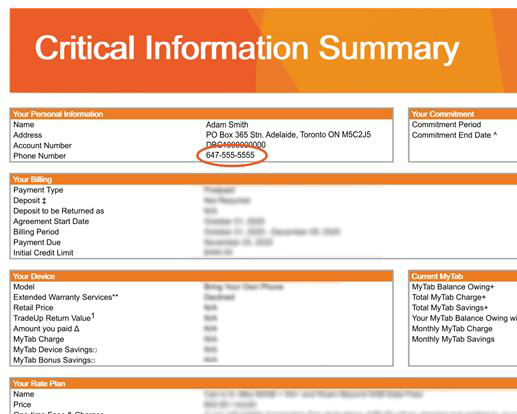
Your new Freedom 5G Home Internet service will now be included in your existing My Account. You can continue to manage your account using your current Freedom Mobile number and PIN.
Important: You have 30 days to activate your SIM. If you don’t activate within that time, your service will be cancelled.
Set Up the Nokia Gateway
We recommend placing the Nokia gateway device in your home where you receive a strong reception on your Freedom Mobile phone, such as near a window or on a shelf, to receive better signal.
To set up your Nokia gateway device, follow the steps below:
1. Download the Nokia WiFi app onto your phone or tablet from the App Store or Google Play Store.
2. In the Nokia WiFi app, tap Get Started.
For quick setup, choose the Scan code option. Scan the QR code on the bottom of the device.
If the quick setup option fails, choose the No QR Code? Enter manually option. Choose 4G/5G Gateway, then FastMile 5G Gateway 12.
Check out our set up guide for additional information.
We recommend changing your Wi-Fi name and password during setup. Just tap the pencil icon beside your current Wi-Fi name and password. After making this change, you’ll need to reconnect your devices using the new name and password.
Change Wi-Fi Network Name and Password
Before attempting to change your Wi-Fi network name and password ensure you are connected to your network. You can complete this change in two ways:
Open Settings, tap Wi-Fi Networks, then tap your current network name.
Tap the pencil icon in the top-right corner to edit.
Tap the checkmark to save your changes.
Go to http://192.168.1.1.
Click Sign in from bottom-left and enter the username and password printed on your device.
Select Wi-Fi, then tap Wi-Fi Networks from the left menu.
Click Detail under the Home Network card.
Update the SSID name to change your Wi-Fi name.
Update the WPA key to change your password.
Click Save in the top-right corner.
After changing your network name and password, you’ll need to reconnect your devices using the new name and password.
Check Your Home Internet Usage
You can easily monitor your usage in My Account. Here’s how:
Log in to My Account.
Go to the Overview page.
Your current data usage for Freedom 5G Home Internet will be displayed on the dashboard.
Don’t see what you’re looking for?
If you don’t see your answer in our FAQ section, we’re here to help.
All Freedom Mobile services are subject to our Terms of Service, MyTab Additional Terms of Service, TradeUp Additional Terms of Service, Fair Usage Policy and Privacy Policy.
*Starting July 24 2023, all Freedom Mobile subscribers (excluding prepaid and select applicable plans) that have recurring Freedom Network and/or Nationwide data allotments will have their Freedom Network and/or Nationwide data converted into Freedom Nationwide data. Freedom Nationwide data is defined as data that can be used on both Freedom and Canadian partner networks. Only recurring Freedom data and/or Nationwide data will be converted to Freedom Nationwide data. This excludes Data Passes, Big Binge Bonus Data and Pay Per Use data amounts.
**All of our in-market monthly phone plans have 5G and 5G+ speeds available. To access 5G/5G+ speeds on one of these plans, you need to have a 5G/5G+ enabled device with a 5G/5G+ enabled SIM card and you need to be in a 5G/5G+ coverage area.
1. MyTab monthly payment required.
Savings based on Regular Selling Price. MyTab monthly payment required for 24 months. Conditions apply. Offer subject to change or cancellation without notice. Taxes, government fees and pay-per-use charges are extra. Early cancellation fees apply. For TradeUp, additional savings are contingent on return of device in eligible condition within month 24.
2. Applicable taxes extra.
3. Digital Discount
Digital Discount promotion is subject to change or cancellation without notice. To be eligible to receive the $5/month Digital Discount, you must (i) be subscribed to a Prepaid or Postpaid line on an eligible plan (in-market plans, except for Prepaid By The Year, Tablet and Watch plans), (ii) sign up for Auto Pay (pre-authorized payments), (iii) have an active and valid Auto Pay method on file, and (iv) redeem the “Digital Discount” promo code at a Freedom Mobile retail location or through your My Account. The promo code can only be applied once to each eligible line. A $5 monthly discount will start to be applied on your next top-up date following promo code redemption (for Prepaid customers), or on your next bill following promo code redemption (for Postpaid customers). Postpaid customers: you must complete the above eligibility requirements on the same day you activate your eligible plan to ensure the discount is received on your first/next bill. If you are not eligible for the promotion during any month, that monthly discount will be entirely forfeited and cannot be made up. If you qualify for the discount in the months following the ineligible month, you will receive the discount in those subsequent months. Movement between eligible plans will not result in the loss of the monthly discount. Your service will no longer be eligible for the discount if you: (a) Change your rate plan to a non-eligible plan, or (b) Port your number away from Freedom Mobile. Applicable taxes extra.
4. Unlimited Plans Data Policy
Freedom Mobile’s unlimited data plans include (depending on your selected plan) from 25GB to 250GB of full-speed data that can be used at 5G and 5G+ speeds on the Freedom network (where available) and at 4G speeds (up to 100 Mbps) on partner networks in Nationwide, the U.S., and Mexico (as applicable, see freedommobile.ca/plans for plan details). See freedommobile.ca/coverage for more information on Freedom’s coverage area. Once your full-speed allotment is depleted, you will continue to have access to data services, with no data overage fees, but at a slower speed – of up to 256 kilobits per second (for downloads) and 128 kilobits per second (for uploads) on the Freedom Network, and up to 128 kilobits per second (for downloads) and 64 kilobits per second (for uploads) on partner networks in Nationwide, the U.S., and Mexico (as applicable) – until the end of your current billing cycle. Applications such as web browsing, email, instant messaging, voice over IP services, or low-quality audio streaming will continue to work, but at a slower speed. Applications that normally require greater bandwidth, such as video streaming or peer-to-peer file sharing will also continue to work, but the slower speed may affect application performance. We will send you a text message notifying you when you have used 70% and 100% of the full-speed allotment included in your plan, at which point you may choose to purchase a data add-on to add more full-speed data to your plan. In all cases, usage is subject to the Freedom Mobile Terms of Service and Fair Usage Policy.
5. 5G and 5G+ Access
5G/5G+ access is available with a 5G/5G+ plan, a 5G/5G+ compatible phone, and when you're within the Freedom 5G/5G+ network coverage areas. 5G and 5G+ performance may vary due to various factors, including environmental conditions, with 5G+ theoretical peak download speed of up to 900Mbps in select cities. When outside 5G and 5G+ areas, LTE speeds may be accessed where coverage is available. Visit the Coverage Map for 5G/5G+ availability and details.
6. Network Coverage
Based on Freedom and our Nationwide partner network coverage across Canada. See Coverage Map for details.
7. Student Offer
Offer is available for a limited time at participating Freedom Mobile locations and is subject to change or cancellation without notice. $45/mo. is based on a $50/mo. plan after Digital Discount, less a $5/mo. student offer credit for 18 months. To be eligible for the student offer, you must activate a new line on an eligible plan (in-market Total Freedom 175GB + Roam Beyond 10GB and up plans in Ontario, Alberta and B.C.) and have a promo code applied during the promotion period. You must be a student of an eligible post-secondary institution and, during the new activation, must: (i) show proof of enrollment (either a student ID or enrollment letter), (ii) use an eligible student email address on the account (each email address can only be used once) and (iii) create a new 1-line account (new lines on existing accounts are not eligible). The credits will start to be applied before tax prior to your 2nd full month of service. You will receive a $5 credit off the monthly plan price for 18 months as long as you remain active on an eligible plan. Each promo code can only be used once and applies to one line only - not the full account. The promotion may not be combined with other in-market recurring discount offers, except for Digital Discount unless otherwise indicated. Your service will no longer be eligible for the discount if you: (a) change your rate plan to a non-eligible plan, or (b) change your email address from a student domain to an ineligible domain. If you are not eligible for the promotion during any month, the credit will be entirely forfeited and cannot be made up. If you qualify for the credit in the months following the ineligible month, you will continue to receive the credit as applicable.
8. Roam Beyond Plans
Destinations included within Roam Beyond are subject to change (destinations may be added or removed). Visit freedommobile.ca/roam-beyond or My Account to view a current list of destinations included and for 30-day Roam Beyond pass options.
9. Standard Voicemail
Standard Voicemail (offered on 4G LTE plans) can store up to 5 messages, with each message stored for up to 5 days. Voicemail+ (offered on 5G+ plans) can store up to 50 messages, with new messages stored for up to 30 days and saved messages stored for up to 90 days. Messages can be resaved during the storage period but will be deleted if past the storage period. Monthly plan customers with Standard Voicemail can upgrade to Voicemail+ by subscribing to the monthly add-on.
10. Pay Per Use Charges
Apple Watch plan utilizes the Freedom Nationwide data included in your associated phone plan when connected via Bluetooth. Pay Per Use Charges may apply.
11. Freedom Mobile + Home Internet bundle credit
To be eligible for the $5/mo. ongoing credit, you must activate a new line on, complete a hardware upgrade on, or migrate to, an eligible in-market plan and also subscribe to Freedom Home Internet. The credits will start to be applied to your wireless rate plan by your 2nd bill after you’ve both (i) signed up on the eligible plans and (ii) successfully activated Freedom Home Internet. You must live in an internet serviceable area to be eligible for the bundle credit. Please check if Freedom Home Internet is available in your neighbourhood here.
You will receive a monthly credit off the monthly price of your wireless rate plan as long as you remain active on an eligible wireless rate plan and an eligible Freedom Home Internet plan. The credits will be applied before tax. The promotion may not be combined with any other in-market recurring discount, except for Digital Discount, unless otherwise indicated. Your service will no longer be eligible for the credit if you: a) Change your rate plan to an ineligible plan, or b) no longer subscribe to Freedom Home Internet. If you are not eligible for the promotion during any month, that credit will be entirely forfeited and cannot be made up.
12. 911 Levy
In Alberta, a $0.95 monthly 911 levy applies.
13. 1000 Long Distance Minutes Offer
Offer is available for a limited time and is subject to change or cancellation without notice. Applicable taxes extra. To be eligible for the promotion, you must activate a new line or complete a phone upgrade, on an eligible plan ($35+/mo. plans after Digital Discount) during the promotion period. You will receive 1000 long distance minutes per month for 24 months that can be used to call the following destinations from Canada, as long as you remain active on an eligible plan: Australia, Bangladesh, Brazil, China, Germany, Hong Kong, India, Japan, Malaysia, Mexico, Singapore, South Korea, Taiwan, United Kingdom. Any unused minutes are non-refundable and non-transferable. The promotion may not be combined with any other long distance offers.
14. 25GB Bonus Data Offer
To get 25GB of Canada-U.S.-Mexico monthly recurring bonus data, you must activate a new line with purchase of a device on MyTab on a 24 mo. term, or complete a hardware upgrade on the eligible Total Freedom 10GB + Roam Beyond 1GB or Total Freedom 70GB + Roam Beyond 1GB plan. The bonus data will be attached to your service within 30 days of MyTab activation, or hardware upgrade, and will remain available on your service for as long as you remain active on the eligible plan. For existing customers, your service will no longer be eligible for any bonus data offers you currently have attached to your service if you change your rate plan to any current in-market plan.
15. Price Freeze Promise
Price Freeze Promise is our guarantee that the price of a wireless rate plan (prior to any discounts or credits) that any customer subscribes to and maintains will never incur a price increase. This guarantee applies to all past and current wireless rate plans available to our customers. The Price Freeze Promise only covers the wireless rate plan price itself, and not any other charges or fees, such as taxes, levies, pay-per-use charges, one-time passes, add-ons, device financing charges (such as MyTab and TradeUp charges), or any other additional charges/fees.
16. 3rd+ Lines $15/mo. Credit Bring Your Own Phone Offer
The $30/month price is based on a $45/month Total Freedom 100GB plan after Digital Discount, and less a $15/mo. ongoing 3rd+ line offer credit. To be eligible for the 3rd+ line offer, you must: (i) have a minimum of two other active line on the same account on an eligible plan ($40+/mo. after Discount Discount), (ii) activate new additional Bring Your Own Phone line(s) on an eligible plan (in-market Total Freedom 100GB + Roam Beyond 5GB and up plans (excluding the Total Freedom 125GB + Roam Beyond 5GB plan)) during the promotional period, and (iii) not have canceled any line on your account within 60 days before activating this offer or any time after activating this offer. Maximum 3 lines per account are eligible to receive the $15/mo. credit. The $15/mo. credit will only be applied to the additional new Bring Your Own Phone line(s). The credits will start to be applied before tax to your first month of service after adding the new additional line(s). You will receive a $15 credit off the monthly plan price for as long as you remain active on an eligible plan. The promotion may not be combined with any other in-market recurring discount offers, except for Digital Discount. A line on your account will no longer be eligible for the promotion if you: a) change the rate plan on the new line(s) to an ineligible plan, or b) no longer have a minimum of two other active line on the same account on an eligible plan. If you are not eligible for the promotion during any month, that credit will be entirely forfeited and cannot be made up. If you qualify for the credit in the months following the ineligible month, you will continue to receive the credit as applicable.
17. S26FE 128GB save up to $1,050 with TradeUp and Trade-In
Offer available for a limited time only at select stores to eligible customers on approved credit and while supplies last. This offer is subject to change or cancellation without notice. Trade in offer is only valid on the purchase of Samsung Galaxy S26FE 128GB activated on the Freedom Mobile network on a 24-month services agreement. Must be on a minimum $50/mo. plan (with Digital Discount) with TradeUp. Must be legal owner of the phone traded in. Maximum 1 phone per trade-in. Samsung Galaxy S26FE 128GB $1,050 savings is based on $282 MyTab Savings, upfront savings of $336 TradeUp amount, $432 trade-in value ($32 trade-in credit & $400 bonus trade-in credit) for trading in any eligible Samsung phone with a minimum trade-in value of $32, for a total savings of $1,050 to offset the full retail price of $1,050 over 24 months. The $400 bonus value is available to customers as a MyTab Bonus savings for those who trade-in an eligible Samsung phone with a trade-in value of at least $32. The total value of trade-in credit depends on the phone's condition. You must return the Samsung Galaxy S26FE in eligible working condition at end of the term to achieve full savings.
MyTab Bonus Savings are applied after taxes and at the time of purchase on the new phone. The MyTab Bonus Savings will be applied against the upfront cost or the MyTab charge of the phone and following the application of the phone value trade-in credit. Any unused portion of the MyTab Bonus Savings will be forfeited and may not be used towards the purchase of any other product or service and may not be redeemed for cash. MyTab Additional Terms of Service apply – see freedommobile.ca/en-ca/terms-of-service. Early cancellation fees apply for cancelling your MyTab within 24 months. To receive the credit, your account must remain in good standing. This offer cannot be combined with any other promotional service credit offer. If you downgrade from your plan within 24 months to a plan that is not eligible for a MyTab Savings discount, or to a plan that is only eligible for a lower MyTab Savings discount amount, then you will be charged a fee equal to all, or a prorated part, of the discount received. Offer can be combined with eligible TradeUp credit. TradeUp Additional Terms of Service apply – see freedommobile.ca/en-CA/tradeuptandc. Applicable taxes extra.
18. $400 trade-in bonus on select Samsung phones
Offer available for a limited time only at select stores to eligible customers on approved credit and while supplies last. This offer is subject to change or cancellation without notice. Trade in offer is only valid on the purchase of select Samsung phones activated on the Freedom Mobile network on a 24-month services agreement. Must be on a minimum $50/mo. plan (with Digital Discount). Must be legal owner of the phone traded in. Maximum 1 phone per trade-in. The $400 bonus value is available to customers as a MyTab Bonus savings for those who trade-in an eligible Samsung phone with a trade-in value of at least $25. The total value of trade-in credit depends on the phone condition. The offer is applicable to the following select Samsung phones:
Samsung Galaxy S26, S26+, and S26 Ultra
Samsung Galaxy S26 FE
Samsung Galaxy Flip 8, Fold8, and Fold8 Ultra
MyTab Bonus Savings are applied after taxes and at the time of purchase on the new phone. The MyTab Bonus Savings will be applied against the upfront cost or the MyTab charge of the phone and following the application of the phone value trade-in credit. Any unused portion of the MyTab Bonus Savings will be forfeited and may not be used towards the purchase of any other product or service and may not be redeemed for cash. MyTab Additional Terms of Service apply – see freedommobile.ca/en-ca/terms-of-service. Early cancellation fees apply for cancelling your MyTab within 24 months. To receive the credit, your account must remain in good standing. This offer cannot be combined with any other promotional service credit offer. If you downgrade from your plan within 24 months to a plan that is not eligible for a MyTab Savings discount, or to a plan that is only eligible for a lower MyTab Savings discount amount, then you will be charged a fee equal to all, or a prorated part, of the discount received. Applicable taxes extra.
20. Data By The Gig
Purchase 4G LTE Data when you need it. To purchase, visit My Account.
23. Starter TV Discount
Freedom TV offer is available for a limited time and is subject to change or cancellation without notice. Starter TV discount is a promotional discount of $9/month. Applicable taxes extra. To be eligible to receive the Starter TV discount, you must (i) be subscribed to Freedom Home Internet, (ii) be subscribed to Starter TV and (iii) have a wireless account with Freedom mobile. The discount will take effect as of your Starter TV plan activation date. If you are not eligible for the discount during any month, that monthly discount will be entirely forfeited and cannot be made up. Your service will no longer be eligible for the discount if you: (i) no longer subscribe to Freedom’s Starter TV plan or (ii) no longer have a wireless account with Freedom Mobile. All Freedom TV services are subject to our Freedom Home Internet and TV Terms of Service, Freedom TV Service Agreement, and Privacy Policy
24. Sports Theme Pack Discount
Sports Theme Pack offer is available for a limited time and is subject to change or cancellation without notice. Sports Theme Pack discount is a promotional discount of $1/month. Applicable taxes extra. To be eligible to receive the Sports Theme Pack discount, you must (i) be subscribed to Starter TV, (ii) be subscribed to Sports Theme Pack and (iii) have a wireless account with Freedom Mobile. The discount will take effect as of your Sports Theme Pack activation date. If you are not eligible for the discount during any month, that monthly discount will be entirely forfeited and cannot be made up. Your service will no longer be eligible for the discount if you: (i) no longer subscribe to Freedom’s Sports Theme Pack, or (ii) no longer have a wireless account with Freedom Mobile. All Freedom TV services are subject to our Freedom Home Internet and TV Terms of Service, Freedom TV Service Agreement, and Privacy Policy.
26. Determining the value of your Trade-In Device
Offer subject to change without notice and is available for a limited time at Freedom Mobile corporate stores and participating Freedom Mobile dealer locations.
Must be the legal owner of the phone traded in. Maximum 1 phone per trade-in. Your device Trade-In value is determined by us at our sole discretion and is based on phone make, model, and physical condition. You will not receive extra value for trading in other in-box accessories (Example: charger, earbuds, external case, etc.). If we determine, at our sole discretion, that your Trade-In Device has no Trade-In value we will gladly take it and recycle it for you. As part of our ongoing green initiatives, any mobile phone may be dropped off at any Freedom Mobile store for responsible recycling. All trade-in program details are subject to Trade-In Terms and Conditions.
28. Visual Voicemail One Month Trial
The One Month Trial of Visual Voicemail is subject to change or cancellation without notice. The Visual Voicemail add-on is only available to customers that subscribe to a plan with data allotment (excluding 4G plans), and are on a compatible device. For more details, please refer to: https://www.freedommobile.ca/en-CA/support/What-is-Visual-Voicemail. You will receive a one-time $4 credit for the first full month of your Visual Voicemail subscription, which will appear in your monthly bill. To be eligible to receive the $4 credit for the One Month Trial of Visual Voicemail offer, you must (i) be subscribed to a plan with data allotment (excluding 4G plans), and on a device that is compatible with the Visual Voicemail add-on, as outlined above, and (ii) subscribe to Visual Voicemail. The promotion can only be applied once to each eligible line. After your first full month of Visual Voicemail has completed, you will be charged the monthly recurring rate of $4 for Visual Voicemail unless you unsubscribe to the service. Your service will no longer be eligible for the discount if during the promotion period you (a) change your rate plan to a non-Eligible Plan, or (b) port your number away from Freedom Mobile. Applicable taxes extra. All Freedom Mobile services are subject to our Terms of Service, MyTab Additional Terms of Service, Fair Usage Policy and Privacy Policy.
30. Freedom Home Internet pricing
Applicable taxes extra. Internet plan pricing and availability is subject to change or cancellation without notice. Internet plans include one modem and one eero 6 Wi-Fi router rental. For the first eero router rental you will see a charge of $5/mo. with a corresponding $5/mo. discount, to ensure that it's on us. Additional eero 6 Wi-Fi routers may be necessary to provide full home coverage, depending on the size of the home, and are available for an additional rental fee of $5/month plus taxes per unit. There are no fees for activation, installation, or shipping. Rental equipment must be returned to Freedom in good working condition within 30 days of cancellation, otherwise the undiscounted value of the equipment will be charged. Connection speeds may vary based on location, equipment, wired or wireless connection, customer device capability, building wiring, internet traffic and environmental conditions. Any speeds indicated are "up to" and based on optimal network, equipment, and customer device conditions. Service availability is based on where access / technology permits, and all internet orders must be confirmed with the network provider. All Freedom Home Internet services are subject to our Freedom Home Internet and TV Terms of Service, Freedom Home Internet Service Agreement, Freedom Home Internet Acceptable Use Policy, Freedom Home Internet's ITMP (Internet Traffic Management Policy), and Privacy Policy.
31. Freedom Home Internet Introductory offer
Freedom Home Internet offer is available for a limited time and is subject to change or cancellation without notice. In most Ontario markets, the regular price is $45/mo. The $39/mo. introductory price includes a $6/mo. credit for 12 months. While in the other markets, the regular price is $55/mo. The $39/mo. introductory price includes a $16/mo. credit for 12 months. Applicable taxes extra. To be eligible to receive the Internet Plan discount, you must (i) be subscribed to an eligible Freedom Home Internet plan and (ii) have a wireless account with Freedom mobile. The discount will take effect as of your Freedom Home Internet activation date. If you are not eligible for the discount during any month, that monthly discount will be entirely forfeited and cannot be made up. Your service will no longer be eligible for the discount if you: (i) change your Internet plan or (ii) no longer have a wireless account with Freedom Mobile. All Freedom Home Internet services are subject to our Freedom Home Internet and TV Terms of Service, Freedom Home Internet Service Agreement, Freedom Home Internet Acceptable Use Policy, Freedom Home Internet's ITMP (Internet Traffic Management Policy), and Privacy Policy.
32. Internet plan pricing and availability is subject to change or cancellation without notice. Freedom Home Internet is available to Freedom Mobile customers with an account in good standing and at a serviceable address. Service availability is based on where access / technology permits, and all internet orders must be confirmed with the network provider. Confirmation of service normally occurs within 48 hours of order submission. Connection speeds may vary based on location, equipment, wired or wireless connection, customer device capability, building wiring, internet traffic and environmental conditions. Any speeds indicated are "up to" and based on optimal network, equipment, and customer device conditions. Maximum one Freedom Home Internet account per Freedom Mobile account. All Freedom Home Internet services are subject to our Freedom Home Internet and TV Terms of Service, Freedom Home Internet Service Agreement, Freedom Home Internet Acceptable Use Policy, Freedom Home Internet's ITMP (Internet Traffic Management Policy), and Privacy Policy.
33. MyTab+
MyTab+ allows eligible customers to complete a virtual TradeUp return and instant buy-back in the form of a new agreement where you can pay the balance over 24 months.
34. Freedom TV
Applicable taxes extra. A Freedom Home Internet subscription is a prerequisite for Freedom TV. Freedom TV plans, packages, and channels (availability and pricing) are subject to change or cancellation without notice. Channel line-up will vary by region and local channels are only available in their respective regions. All programming is only available within Canada and is provided on a “subject to availability” basis. Certain programming transmitted by Freedom, including sports events, may be “blacked out” in your area of reception sometimes for copyright or other reasons. When you are using Freedom TV through the Freedom TV app away from your service address, certain programming may be unavailable, or you may be subject to limitations with respect to viewing programming on certain devices. All Freedom TV services are subject to our Freedom Home Internet and TV Terms of Service, Freedom TV Service Agreement, and Privacy Policy. The Freedom name and logos and other words, titles, phrases, marks, logos, icons, graphics are trademarks of, or used under license by, Videotron Ltd., doing business as Freedom Mobile. All other trademarks are the property of their respective owners. All rights reserved.
35. Save up to $1,053 on iPhone 18 Pro (256GB)
Offer is available for limited time, or while quantities last, at participating Freedom Mobile retail locations only, and is subject to change or cancellation without notice. To be eligible for the promotion, you must:
1. Activate a new service on, or upgrade your phone to an iPhone 18 Pro (256GB) with MyTab and TradeUp; and
2. Select a $70+/mo. (with Digital Discount) phone plan on a 24-month service agreement.
The $1,053 savings is based on the $1,749 retail price of an iPhone 18 Pro (256GB) with $0 upfront, less $360 MyTab savings and $693 TradeUp amount. You must return device in eligible working condition at end of term to achieve full savings. Your service will no longer be eligible for the promotion if you: a) downgrade your phone rate plan to a non-eligible plan; b) return your phone, or c) port your number away from Freedom Mobile. MyTab Additional Terms of Service apply – see freedommobile.ca/MyTab. Early cancellation fees apply for cancelling your MyTab within 24 months. If you downgrade from your plan within 24 months to a plan that is not eligible for a MyTab Savings discount, or to a plan that is only eligible for a lower MyTab Savings discount amount, then you will be charged a fee equal to all, or a prorated part, of the discount received. TradeUp Additional Terms of Service apply – see freedommobile.ca/en-CA/tradeuptandc. For Digital Discount program details and how to redeem your $5 monthly discount, visit freedommobile.ca/digitaldiscount. Applicable taxes extra.
36. iPhone 18 Pro (256GB) for Absolute Zero with TradeUp when adding Freedom Home Internet
Offer available for a limited time only at select stores to eligible customers on approved credit with serviceable addresses for Freedom Home Internet and while supplies last. This offer is subject to change or cancellation without notice. This offer is not available in Manitoba. To be eligible for the promotion, you must:
Activate a new service on, or upgrade your phone to an iPhone 18 Pro (256GB) with MyTab and TradeUp; and
Select eligible $100/mo. (with Digital Discount) phone plan on a 24-month service agreement; and
Within 30 days of purchasing that new phone, subscribe to Freedom Home Internet.
Once eligible, you’ll receive $576 in promotional credits applied as a $24 monthly credit on your account for up to 24 months to a maximum of $576. This promotional credit is to offset the monthly MyTab with TradeUp charge of $24/mo. for the iPhone 18 Pro (256GB) on a 24-month service agreement with eligible phone plan. The credits will start to be applied to your account as a bill adjustment before tax on your 2nd bill after you’ve successfully activated Freedom Home Internet. The credits will be applied as long as your account is in good standing (not suspended or cancelled) and as long as you continue to be eligible. Your service will no longer be eligible for the promotion if you: a) downgrade your phone rate plan to a non-eligible plan; b) return your phone, c) port your number away from Freedom Mobile or d) no longer subscribe to Freedom Home Internet. MyTab Additional Terms of Service apply – see freedommobile.ca/MyTab. Early cancellation fees apply for cancelling your MyTab within 24 months. If you downgrade from your plan within 24 months to a plan that is not eligible for a MyTab Savings discount, or to a plan that is only eligible for a lower MyTab Savings discount amount, then you will be charged a fee equal to all, or a prorated part, of the discount received. Absolute Zero with TradeUp requires the phone to be returned in eligible condition at the end of the 24-month term or the TradeUp amount that you saved upfront will apply. TradeUp Additional Terms of Service apply. See freedommobile.ca/en-CA/tradeuptandc. For Digital Discount program details and how to redeem your $5 monthly discount, visit freedommobile.ca/digitaldiscount. Applicable taxes extra.
37. Samsung Galaxy S26 ON US with TradeUp + Freedom Home Internet Offer
Offer is available for a limited time and is subject to change or cancellation without notice. This offer is for a special promotional discount of $10/month, which, together with the $5/month Freedom Mobile + Home Internet bundle credit, offset the MyTab charge for this phone so that it’s effectively “ON US”. To be eligible to receive this discount, you must: (i) purchase a new Samsung Galaxy S26 256GB with TradeUp on a 24-month MyTab services agreement term during the promotion period; (ii) activated on a new $60/mo. Freedom Mobile postpaid plan (with Digital Discount); and (iii) within 30 days of purchasing that new phone, subscribe to Freedom Home Internet. The special promotional discount will take effect prior to your first full month of service after you’ve successfully activated Freedom Home Internet. You will receive the $10 credit on your account each month for the duration of your 24-month MyTab services agreement term, as long as all of those services remain active on your Freedom account. This offer may not be combined with other recurring discount offers. If you are not eligible for the discount during any month, that monthly discount will be entirely forfeited and cannot be made up. Your service will no longer be eligible for the discount if you: (i) no longer subscribe to Freedom Home Internet; or (iii) no longer have a wireless account with Freedom Mobile. ON US with TradeUp requires the device to be returned in eligible condition at the end of the 24-month term or the TradeUp amount that you saved upfront will apply. Serviceable addresses required for Freedom Home Internet. Applicable taxes extra.